For chamber members, BNI groups, and trade-show networkers

A business card scanner that drafts your follow-up email.

You met them. Now actually follow up.

Scan a business card and AfterShake pulls the contact info and drafts a personal follow-up email about what you actually talked about. Send it before you leave the parking lot. No more coming home to a stack of cards and an evening of typing.

Free to start. 5 card scans a month, no credit card.

65+downloads across
iPhone and Android

WEBB LANDSCAPING & DESIGN
Marcus Webb
Owner
marcus@webblandscaping.com
(737) 445-1092
AI draftedReady in seconds
Following up: AI for Webb Landscaping & Design

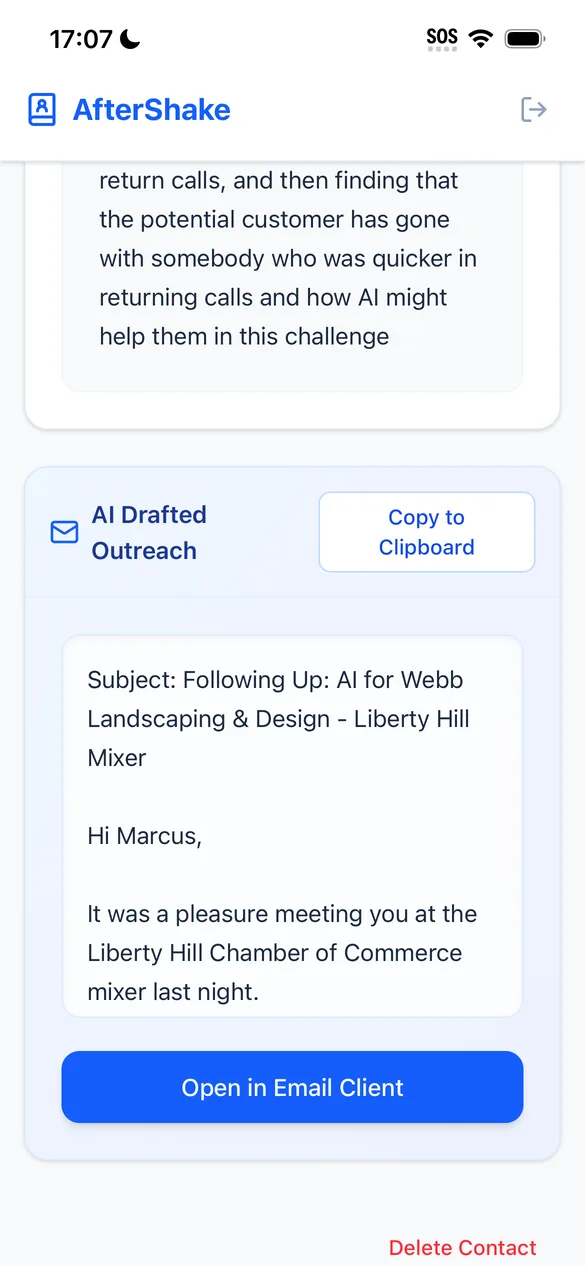
Hi Marcus, it was a pleasure meeting you at the Liberty Hill Chamber mixer last night. You mentioned how hard it is to return calls when you're on job sites all day...

Met at: Liberty Hill Chamber after-hours mixer
Talked about: missed calls, busy season

Example contact

30 cards.Handed out. 1 reply came back.

Why AfterShake exists

When I started going to chamber events, I handed out about thirty of my own business cards and waited for people to reach out. Exactly one person did, and even that email was a generic copy and paste that didn't mention anything we'd talked about.

That's when it clicked: almost nobody follows up. The rare person who does usually does it lazily. So a specific, thoughtful follow-up is one of the easiest ways to stand out in a room.

I started collecting cards instead of handing them out. It worked, but I'd come home from every mixer with a stack of cards and an evening of typing. I build AI automation for a living, so I automated it. That's AfterShake.
How it works

From handshake to sent email in about a minute.

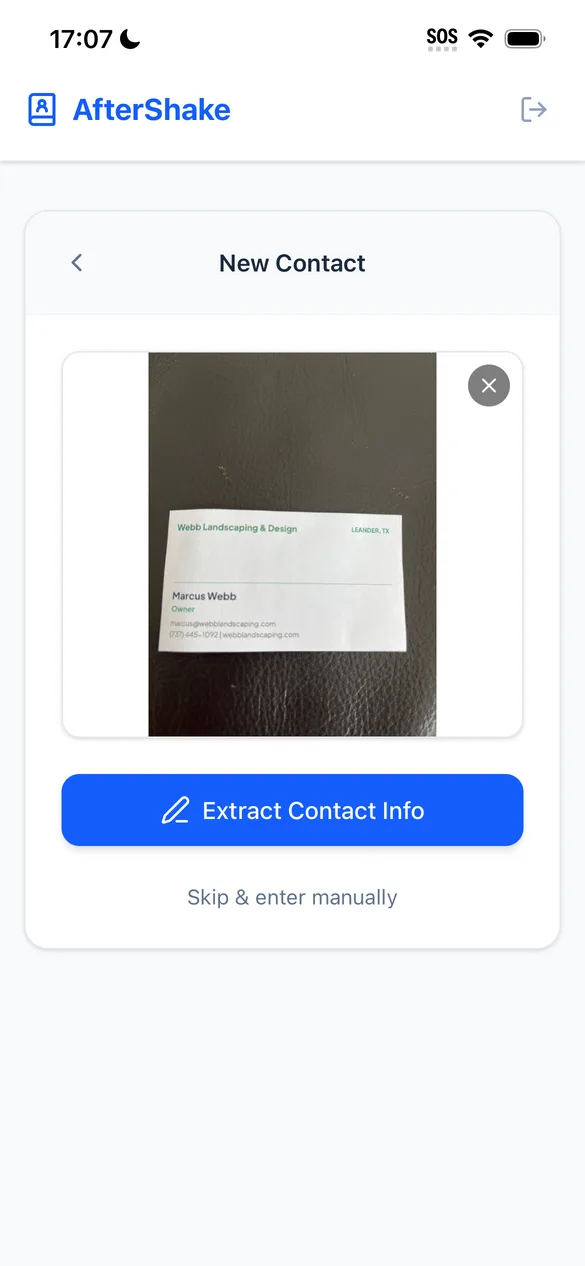
  1. AfterShake camera screen scanning a business card

    Never type a card again

    Take a photo. AfterShake reads the name, title, company, email and phone, and fills in the contact for you. No typing, and no guilty pile of cards waiting on your desk.

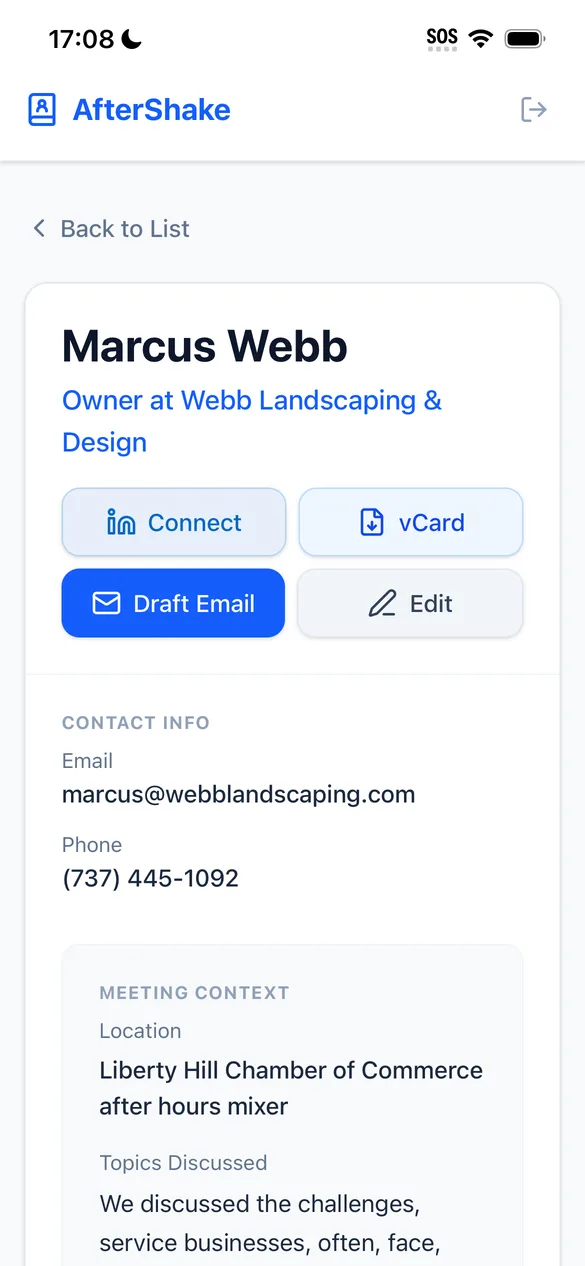
  2. Contact detail screen with meeting context

    Remember what you talked about

    Where you met and what you talked about. That one line is what turns a template into an email that sounds like you remember them.

  3. AI-drafted follow-up email ready to send

    Be the one who actually follows up

    AI writes a personal follow-up email and a short text version. Tweak either one, then open it in your own email app or Messages and hit send. That is how you become the person who actually follows through.

Your email appGmail, Outlook, Apple Mail, Proton. Whatever you already use.
vCard exportSave any contact straight to your phone or import it elsewhere.
Searchable listEvery card in one place, with where you met them.
iPhone + AndroidSign in with Google, Apple or email.

New in the October 2026 update

Follow up by text, tag your events, export your list.

Send as TextEvery draft now comes with a short text version. Tap Send as Text and Messages opens with the number and message filled in.
Mobile and office numbersCards that list two numbers now put each one in the right box. Texts go to the mobile.
TagsTag contacts by event, like "Chamber luncheon", and tag a whole night of scans at once.
Better searchSearch by name, company, title, tag, where you met, notes or email. Every word you type has to match.
CSV exportExport your whole list, or just the contacts a search found, to a CSV file.
Steadier card readingScan the same card twice and you get the same fields both times.

Built for people who work the room

If you come home with a stack of cards, this is for you.

Chamber members

Mixers, luncheons, ribbon cuttings

Follow up with everyone you met while the conversation is still fresh, not three weeks later.

BNI and referral groups

Visitors and one-to-ones

Turn the visitor you just met into a scheduled one-to-one with a note that references their business.

Sales reps and founders

Trade shows and conferences

Fifty conversations in a day. Every one of them gets a real follow-up, not a mass blast.

Pricing

Start free. Upgrade when it's paying for itself.

Free
$0
  • 5 card scans every month
  • 3 AI-drafted follow-ups to try
  • vCard export
Pro monthlyMost popular

Try Pro free for 7 days.Full unlimited scans and drafts. Cancel anytime in your App Store or Google Play settings.

$6.99 / month

Free for 7 days, then $6.99 a month.

  • Unlimited card scans
  • Unlimited AI-drafted follow-ups
  • Cancel anytime
Pro lifetime
$46.99 one time

$46.99 once. Less than 7 months of monthly.

  • Everything in Pro
  • Pay once, keep it forever

Try it at your next event. Not working for you? Request a refund within 30 days through the App Store or Google Play. Stuck? Email support@drjulia.ai and we'll help.

AfterShake is built by Dr. Julia AI, LLC: one founder you can email directly at support@drjulia.ai. The app works even if you never upgrade again. Read the refund terms · Meet the founder on LinkedIn

What each plan includes
FeatureFreePro monthlyPro lifetime
Price$0$6.99 / month after a 7-day free trial$46.99 one time
Card scans5 every monthUnlimitedUnlimited
AI-drafted follow-ups3 to tryUnlimitedUnlimited
vCard exportYesYesYes
BillingNo card needed7 days free, then cancel anytimePay once, keep it forever
RefundNot applicableVia the app store30 days, through the store or by email

Upgrade inside the app. Purchases are handled by the App Store or Google Play. The 7-day free trial is for new Pro monthly subscribers. Cancel in your store subscription settings before day 7 to avoid being charged.

Questions people ask at events

FAQ

Does it work with my email?

Yes. AfterShake doesn't send email for you. It opens the drafted message in whatever email app is set up on your phone, so it works with Gmail, Outlook, Apple Mail, Proton Mail and others. The email comes from you, from your address.

Can I get contacts into my CRM or phone?

Every contact can be exported as a vCard, the standard contact file that phones and most contact tools can import. You can also export your whole list, or just the contacts a search found, as a CSV.

Is it on iPhone and Android?

Both. Download it from the App Store or Google Play.

What if the card has an unusual layout?

Most cards scan cleanly. You can review and edit every field before saving, and you can always skip the scan and enter a contact by hand.

What happens to my data?

Your contacts live in your own account. You can export them anytime, and you can delete your whole account from inside the app. Read the full privacy policy.

Can it write texts too?

Yes. Each draft comes with a short text version. Send as Text opens your Messages app with the number and message filled in, so it comes from your own phone. A text version counts as part of the same draft.

How does the free trial work?

New Pro monthly subscribers get 7 days free, then $6.99 a month. Cancel in your App Store or Google Play subscription settings before day 7 and you are not charged. The trial is handled by the store, so it only shows for accounts that have not subscribed before.

What if it doesn't work for me?

Try it at your next event. Not working for you? Request a refund within 30 days of buying the lifetime plan through the App Store or Google Play. If you get stuck, email support@drjulia.ai and we'll help.

How is AfterShake different from other card scanners?

AfterShake does one job: scan the card, draft a follow-up about what you actually talked about, and open it in your own email app. It is not a full CRM. See the side-by-side with NexaLink or Banana, or read what to look for in a business card scanner for networking events.

Dr. Julia Albath, founder of AfterShake

From the founder

"You provide the soul. AI provides the scale."

Dr. Julia Albath, founder of Dr. Julia AI, Leander, Texas

I help small businesses put AI to work, and I'm a regular at chamber events around Central Texas. AfterShake is the tool I built for myself first.

Your next mixer is coming up.

Have AfterShake on your phone before you walk in.